The app
App guide
Everything happens at LP Protocol (/app). This page says what each tab is for and what you can do there.
The top bar
- Connect Wallet. Connecting asks for nothing. To see your own vaults you also sign in: one free message, valid for 2 hours.
- Chain buttons (Optimism, Base, Robinhood, HyperEVM, Arbitrum, Arc) switch your wallet between the supported chains.
- The price banner shows the 24-hour price change of the tokens in the listed pools.
Simulation Ranks: Ladder
The ranking of every listed pool, by how the bots’ strategy has performed there. This is where most people choose a pool.
- Window: rank over the last 1 hour up to 1 week, or all history.
- Strategy: show TIGHT rows, WIDE rows or both. A pool is ranked once for each.
- Chain and DEX tick boxes: show only the chains and DEXs you want.
- Only stock tokens: show only pools of tokenised stocks.
- Min pool TVL and min in-range $: hide pools that are too small for your deposit.
- jump-adj: discount pools whose tokens tend to make sudden large moves.
- Invest opens that pool’s deposit screen.
The columns are explained on Simulation ranks.
Simulation Ranks: Snake
The same ranking drawn over time: one line per pool, #1 at the top. Choose the look-back (1 to 48 hours), rank by skill or by wallet performance, show 10, 20 or 30 lines, and click a pool to highlight it. A pool that holds its place near the top is easy to see.
The deposit screen
Opened by Invest on a pool.
- The pool at a glance: its simulated results, its size, what it is paying and whether its gauge is live.
- Strategy: TIGHT, WIDE or BUILD YOUR OWN.
- Stop loss and trailing stop loss, on pools with a stablecoin side.
- The deposit box: either token or both, with the one-time creation fee included in the total.
- Charts of the pool’s price with its liquidity drawn beside it, its volatility, what the pool is being paid per day, and the liquidity in each tick around the price.
- The position the bot would open right now, and how your deposit would be split.
BYO
Every pool in two lists: swap-fee pools on one side, emissions pools on the other. Each row shows the pool’s TVL, the liquidity in its active tick, its APR, what it paid over the last 24 hours and the pair’s 1-week and 1-month price change. Sort any column, filter by chain and DEX, or search. Double-click a pool, or press its BYO button, to open its deposit screen with BUILD YOUR OWN selected.
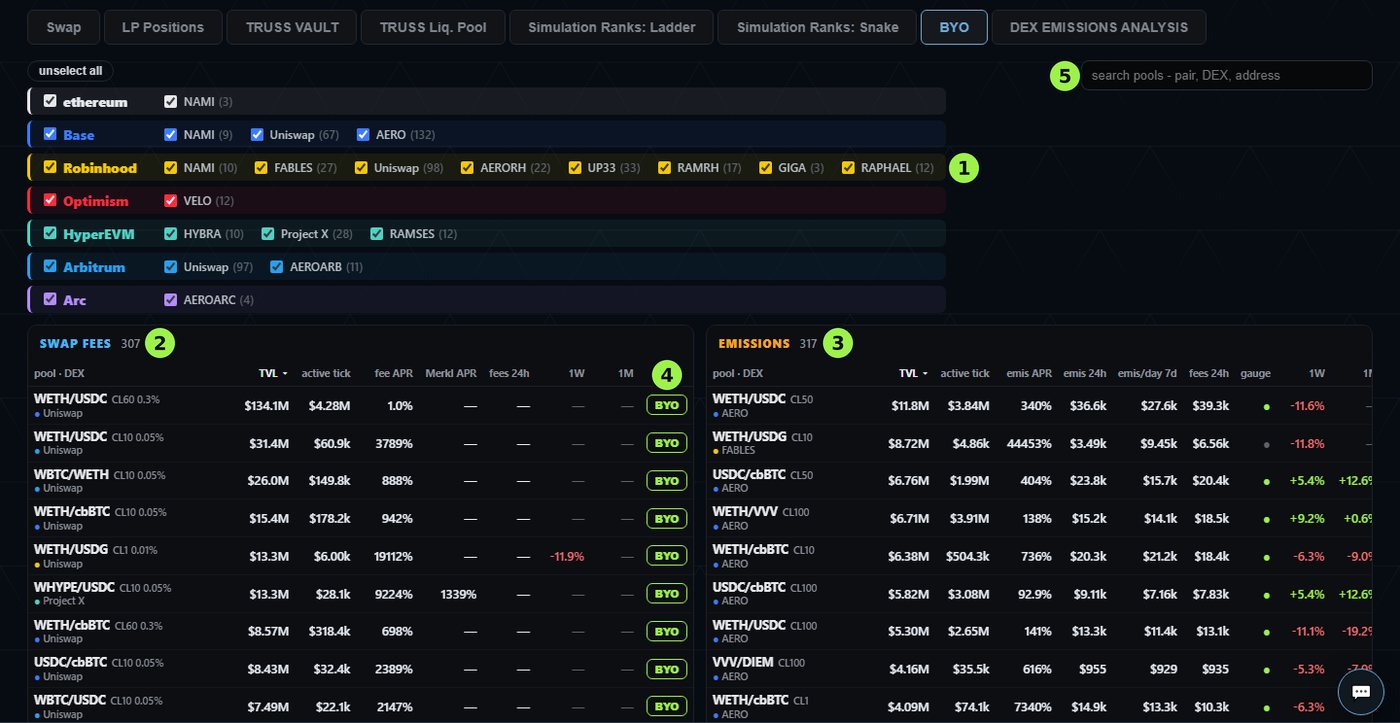
- 1Tick the chains and DEXs you want to see.
- 2Swap fees: the pools that pay swap fees, with their fee APR and any Merkl APR.
- 3Emissions: the pools that pay emissions, with their emissions APR, what they paid, and whether the gauge is live.
- 4BYO opens the pool’s deposit screen with BUILD YOUR OWN selected.
- 5Search by pair, DEX or address.
LP Positions
Your vaults, after you sign in. The list shows each vault’s value, its net P&L and how it stands vs HODL and vs REBAL. Click a vault for its own page:
- Where your money is right now: in the position, loose in the vault, and earned but not yet claimed.
- The pool price against your range, live.
- Value now and P&L, broken down into deposits, earnings, fees, swaps and price moves.
- Charts of your return and of your outperformance vs HODL and vs REBAL over time.
- Every position the bot has held, and the live bot console.
- Add funds, change your stop loss, build or edit a BUILD YOUR OWN tree, and withdraw.
Small tags beside the vault’s name show when it runs WIDE, has a stop loss (SL), a trailing stop (TS) or a BYO tree.
DEX Emissions Analysis
What each DEX is paying its liquidity providers, worked out every hour for the pools the simulator tracks.
- Totals for the window you pick (4 hours to 28 days, or all): emissions paid, the current emissions rate, swap fees, total LP income, and emissions paid per $1 of swap fees.
- Where emissions go, by DEX or by pool.
- Charts of emissions per hour, swap fees per hour, and swap fees against emissions.
- A section for each DEX with its pools, and a table of every DEX’s reward token and price, what its LPs earn, and its emissions and fees.
Use it to see which DEXs and pools are being paid the most, and how that is changing.
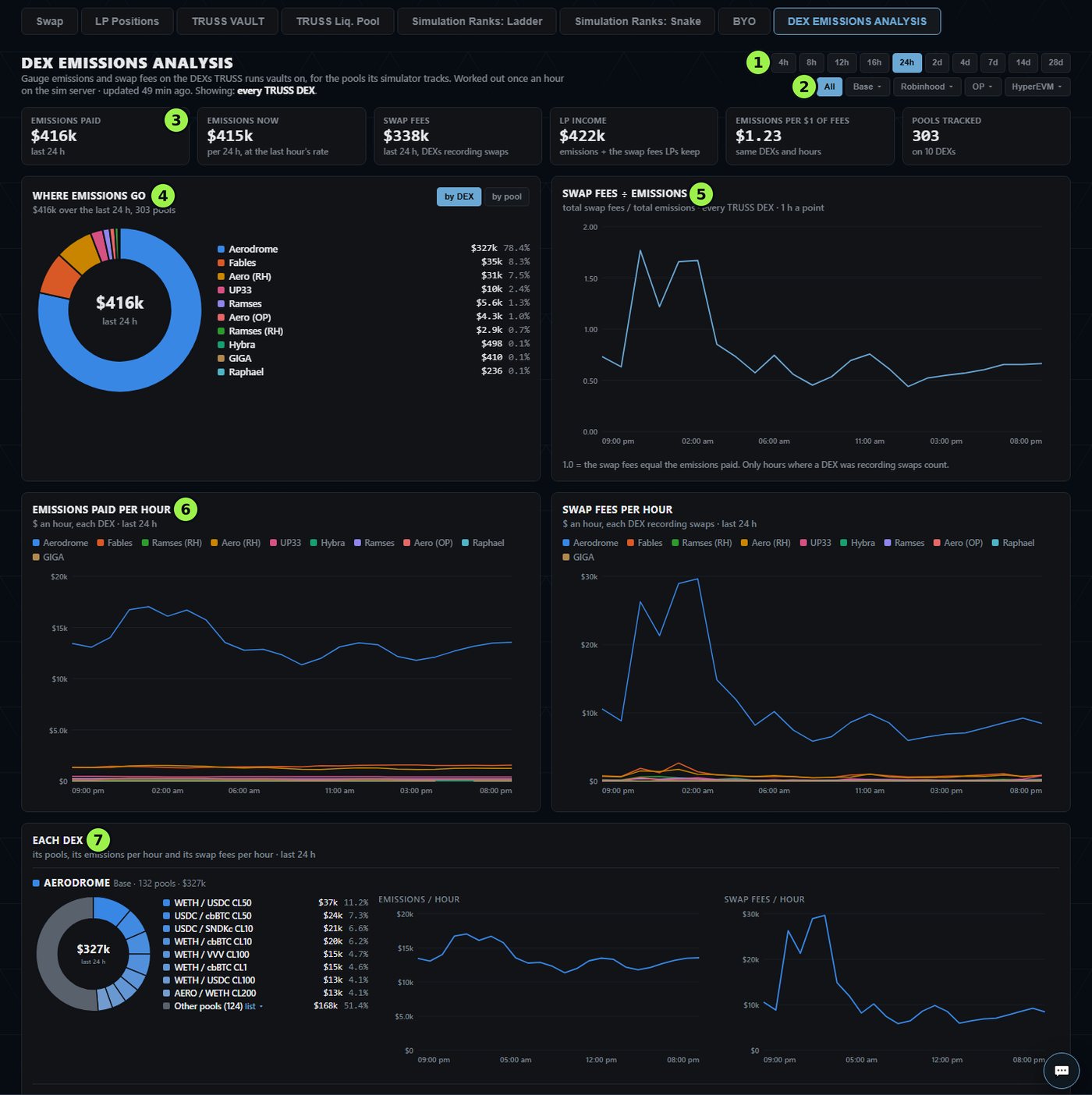
- 1The window: 4 hours to 28 days.
- 2Show every DEX, or the DEXs of one chain.
- 3The totals for the window.
- 4Where the emissions went, by DEX or by pool.
- 5Swap fees against emissions, hour by hour.
- 6Emissions and swap fees per hour, for each DEX.
- 7A section for each DEX, with its largest pools.
Swap
A swap screen and a dust sweep that run from your own wallet. Quotes from TRUSS AGG and the major aggregators are shown side by side. See Swaps & TRUSS AGG.
Help
The chat button opens a support chat once your wallet is connected. Discord and X are linked in the header, and the How to page walks through a first deposit.