TRUSS LP vaults
Build your own
BUILD YOUR OWN lets you draw your vault's strategy yourself: the price range it holds, the prices at which it leaves, and what it does next. The bot then follows your tree exactly, in a vault only your wallet can withdraw from.
What it is
TIGHT and WIDE are TRUSS LP’s own strategies: the bot chooses every range. With BUILD YOUR OWN you choose them. Your strategy is a tree of boxes:
- Box A is the first position: a price range your vault opens as soon as it is funded.
- Every range has exactly two exits: leave high and leave low. Each exit is a price, and each leads to its own next box.
- So A leads to B1 (after leaving high) and B2 (after leaving low), each B to two C boxes, and so on: 1, 2, 4, 8, 16 boxes per level, up to five levels and 31 boxes in all.
What a box can do:
| Box | What the vault does there |
|---|---|
| Open a range | Rebalances into a new position between the two prices you set, with its own leave-high and leave-low exits. |
| Out at 50/50 | Leaves the pool and holds the two tokens half and half. That branch ends there. |
| Out at 100% of one token | Leaves the pool and holds only the token you picked. That branch ends there. |
| Hand over to a bot | The TIGHT or WIDE strategy takes the vault over from that point. |
How to build one
- Open a pool’s invest page from Simulation Ranks or the BYO tab, and pick BUILD YOUR OWN in the strategy row. The BYO tab lists every pool, swap-fee pools on one side and emissions pools on the other.
- Start box A on the chart, then drag its edges and exits, or type the prices. The pool’s liquidity is drawn along the left of the chart, so you can see where other liquidity providers sit. Prices snap to the ticks the pool can actually hold.
- Click a box in the tree to set it up. While you edit a box, the range you would be coming from is shown in faint red and its sibling in faint blue, so you can place the new range against them.
- Optional settings for the whole tree: a trigger wait (how long the price must stay past an exit before the vault acts), a HIGH VOL exit (step out to 50/50 when the price is swinging hard relative to the box), and a stop loss or trailing stop loss.
- Your work is kept in your browser while you build, so a refresh does not lose it. Reset clears it.
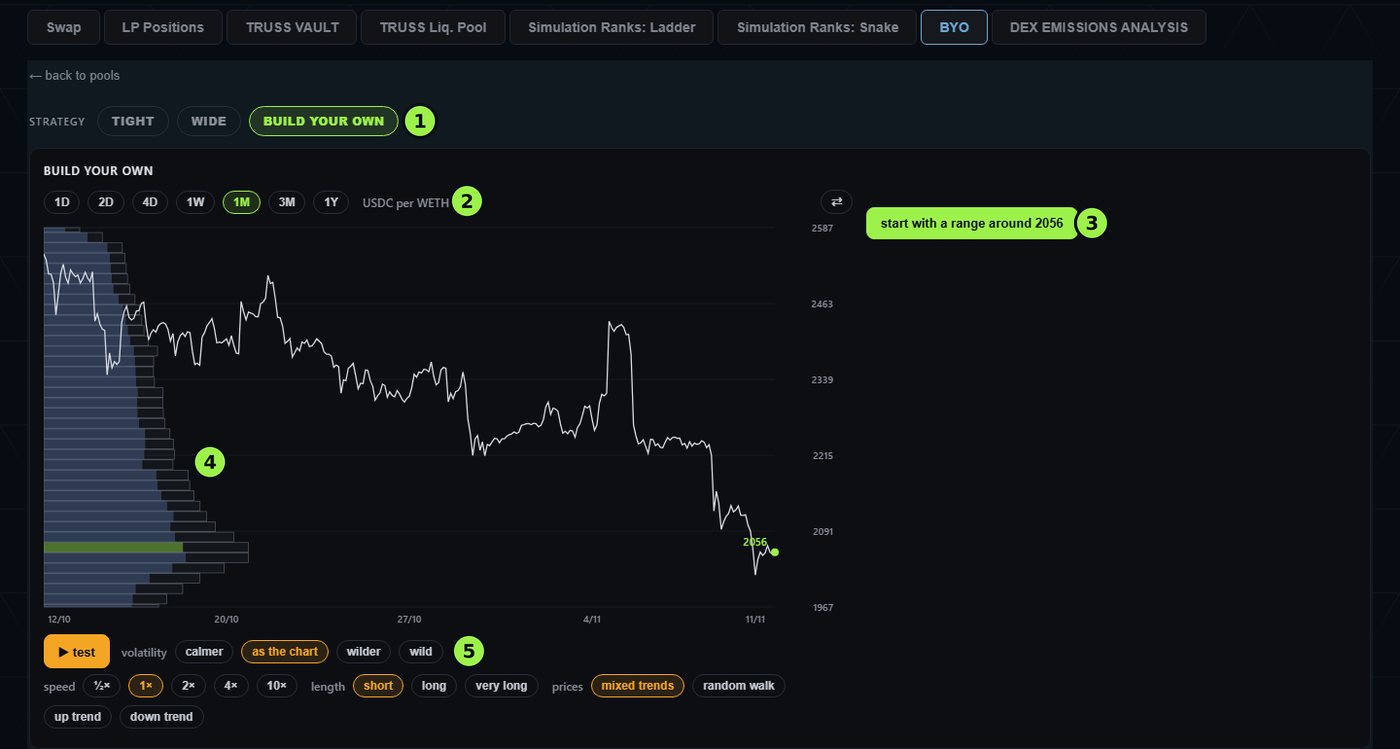
- 1Pick BUILD YOUR OWN in the strategy row.
- 2Choose how much price history the chart shows, from 1 day to 1 year.
- 3Start box A with a range around the current price.
- 4The pool’s liquidity at each price, drawn out from the left.
- 5test runs the tree on made-up prices: choose how volatile, how fast, how long and which way they trend.
Testing it
Press test and the chart plays a made-up price path from the current price. The tree lights up the box the vault would be in, the chart shows each rebalance, and a log lists every move. Each test is a new random path. You can make it calmer or wilder, give it an up trend, a down trend, mixed trends or a plain random walk, run it for longer, and speed it up.
- The result is shown against simply holding the two tokens 50/50.
- It counts the cost of the swaps. What the position would earn in emissions or fees comes on top.
- During a test the liquidity bars drift toward the made-up price the way other liquidity providers tend to follow it. Like the path itself, that is an illustration.
- After several tests the tree shows how often each box was reached, so you can spot branches you never set up.
A test is an illustration on made-up prices. Run as many as you like: it costs nothing and shows how your tree reacts before any money is in it.
Locking it in
- New vault:build the tree on the invest page, then deposit as usual. Right after the deposit you sign one extra message (free, no gas) that saves the exact tree for your vault. Your vault is created either way, and the tree can always be built or changed later on the vault’s page.
- Existing vault: open it under LP Positions. The builder sits on its page: edit, then save with one free signature. The bot picks the change up within seconds.
- If you edit a running tree and the box the vault is in still exists, the vault carries on from that box rather than starting again at A.
- Turn off hands the vault back to the bot’s own strategy.
Only the wallet that owns the vault can save or change its tree. A tree changes what the bot is asked to do; it never changes who can withdraw. Every swap still goes through the vault executor’s on-chain checks, and the fees are the same as for any other vault.
Limits
- Up to five levels and 31 boxes.
- A range’s two edges must be at least 0.5% apart, and a new box’s exits at least 0.5% from the price that opens it, so a tree cannot rebalance in circles.
- Ranges and exits are fixed prices, exactly as you set them. You can edit the tree at any time.
- BUILD YOUR OWN is available wherever a pool’s deposit screen shows it in the strategy row.